
March 21, 2025
Three - texture
Three.js 紋理(Textures)教學摘要
什麼是紋理?
紋理是覆蓋幾何體表面的圖像,不僅影響顏色,還能產生多種視覺效果:
-
顏色/反照率(Albedo)紋理:最基本的紋理,直接應用圖像顏色
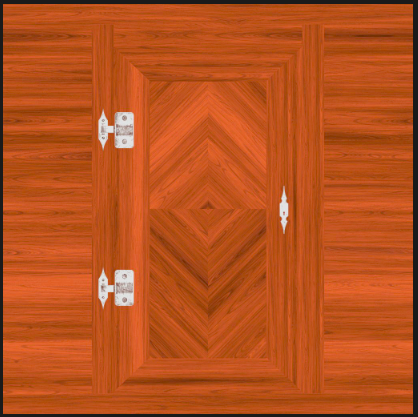
-
透明度(Alpha)紋理:灰度圖像,白色部分可見,黑色部分不可見
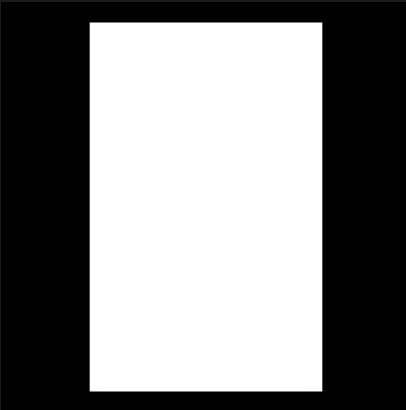
-
高度(Height)紋理:灰度圖像,移動頂點創建浮雕效果
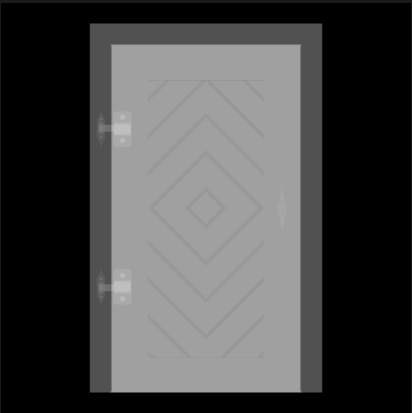
-
法線(Normal)紋理:添加細節,不移動頂點但改變光照方向
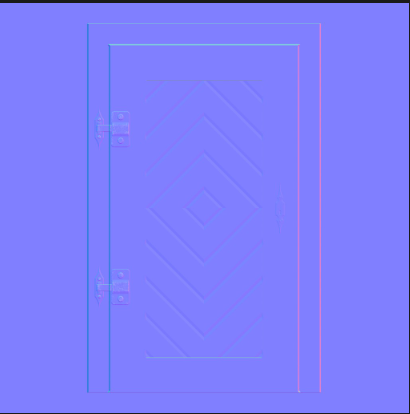
-
環境遮蔽(Ambient Occlusion)紋理:灰度圖像,模擬凹處陰影
-
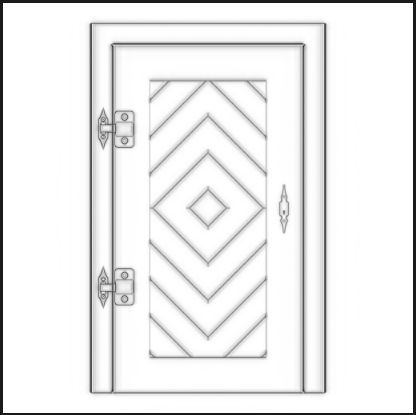
-
金屬度(Metalness)紋理:灰度圖像,指定金屬(白色)和非金屬(黑色)部分
-
粗糙度(Roughness)紋理:灰度圖像,指定粗糙(白色)和光滑(黑色)部分
這些紋理(特別是金屬度和粗糙度)遵循**PBR(基於物理的渲染)**原則,模擬真實世界的光學特性。
如何加載紋理
獲取圖像 URL
- 可放在
/src/文件夾中並通過 import 導入 - 或放在
/static/文件夾中,直接通過路徑訪問
加載圖像的方法
-
使用原生 JavaScript:
const image = new Image() const texture = new THREE.Texture(image) image.addEventListener('load', () => { texture.needsUpdate = true }) image.src = '/textures/door/color.jpg' texture.colorSpace = THREE.SRGBColorSpace -
使用 TextureLoader:
const textureLoader = new THREE.TextureLoader() const texture = textureLoader.load('/textures/door/color.jpg') texture.colorSpace = THREE.SRGBColorSpace -
使用 LoadingManager:
const loadingManager = new THREE.LoadingManager()
loadingManager.onStart = () => {
  console.log('loading started')
}
loadingManager.onLoad = () => {
  console.log('loading finished')
}
loadingManager.onProgress = () => {
  console.log('loading progressing')
}
loadingManager.onError = () => {
  console.log('loading error')
}

const textureLoader = new THREE.TextureLoader(loadingManager)
const colorTexture = textureLoader.load('/textures/door/color.jpg')
colorTexture.colorSpace = THREE.SRGBColorSpace
UV 展開
UV 展開決定了紋理如何映射到幾何體表面。使用 Three.js 內置幾何體時,UV 坐標自動生成。自定義幾何體需手動指定 UV 坐標。
紋理變換
-
重複:
colorTexture.repeat.x = 2 colorTexture.repeat.y = 3 colorTexture.wrapS = THREE.RepeatWrapping // x軸重複 colorTexture.wrapT = THREE.RepeatWrapping // y軸重複 // 或使用鏡像重複 colorTexture.wrapS = THREE.MirroredRepeatWrapping -
偏移:
colorTexture.offset.x = 0.5 colorTexture.offset.y = 0.5 -
旋轉:
colorTexture.rotation = Math.PI * 0.25 // 旋轉45度
colorTexture.center.x = 0.5 // 設置旋轉中心
colorTexture.center.y = 0.5
過濾和 Mipmapping
Mipmapping 技術創建紋理的多個縮小版本,GPU 選擇最合適的版本。
-
縮小過濾(Minification filter):當紋理像素小於渲染像素時使用
colorTexture.minFilter = THREE.NearestFilter // 可選值: NearestFilter, LinearFilter, NearestMipmapNearestFilter, // NearestMipmapLinearFilter, LinearMipmapNearestFilter, LinearMipmapLinearFilter -
放大過濾(Magnification filter):當紋理像素大於渲染像素時使用
colorTexture.magFilter = THREE.NearestFilter
// 可選值: NearestFilter, LinearFilter
如果使用THREE.NearestFilter作為縮小過濾器,可以禁用 mipmaps 節省 GPU 資源:
colorTexture.generateMipmaps = false
colorTexture.minFilter = THREE.NearestFilter
紋理格式和優化
紋理優化需考慮三個關鍵因素:
-
文件大小:使用適當的圖像格式(jpg、png)和壓縮方法
-
尺寸(分辨率):
- 盡可能減小圖像尺寸
- 紋理的寬度和高度應為 2 的冪次方(512x512, 1024x1024 等)
-
數據:
- 需要透明度時使用 PNG
- 法線貼圖應使用無損壓縮(PNG)以保留精確顏色值
紋理資源
可從以下網站獲取紋理:
- poliigon.com
- 3dtextures.me
- arroway-textures.ch
也可以使用 Photoshop 或 Substance Designer 創建自己的紋理。