April 11, 2025
AntiThree(3) - Lusion
Lusion
🔥 可利用概念
- 虛擬重力創意顯示
- 流暢變換顏色
easing.dampC() - 滑鼠物理交互作用
<Model/>的預設物體設定, 可傳 children, 但須注意物理剛體碰撞調整
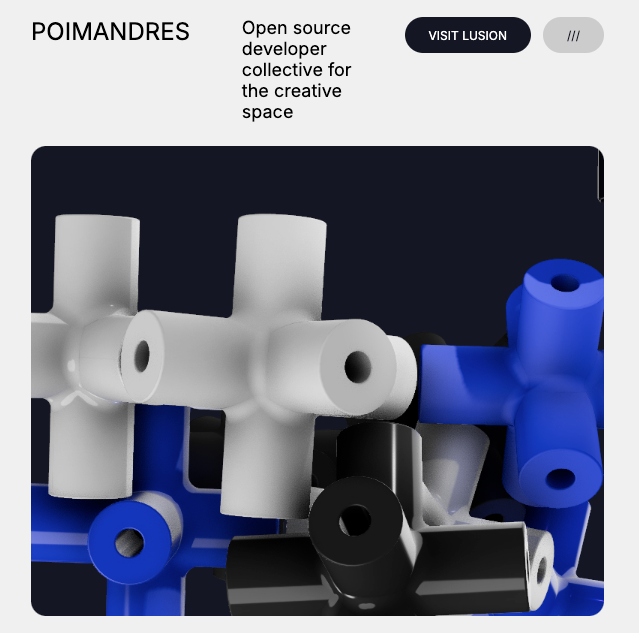
MeshTransmissionMaterial: 透明感材質CuboidCollider: 方塊狀碰撞體(高效能)easing: damp3 流暢更換顏色<Pointer/>: 建立滑鼠位置碰撞剛體, 重力設定(0,0,0), 使其他物體受重力影響集中
| 特性 | <Lightformer /> | <ToneMapping/> |
|---|---|---|
| 目的 | 提供全局性柔和的環境光照,增強反射和光澤效果 | 調整亮度範圍,將 HDR 轉換為可顯示的範圍 |
| 用途 | 用於模擬攝影棚照明,強化反射、鏡面效果 | 用於避免過曝或過暗,壓縮亮度範圍 |
| 控制方式 | 控制光源的形狀、強度、顏色、位置 | 控制圖像的亮度範圍,改變整體的亮度與對比度 |
| 應用場景 | 高反射材質、HDRI 環境貼圖、產品展示 | 瀏覽或渲染高動態範圍影像(HDR),避免過曝或過暗 |
| 效果類型 | 改變光源的形狀、強度、顏色和環境照明效果 | 將 HDR 圖像壓縮到顯示設備的亮度範圍,調整整體圖像效果 |
<Environment resolution={512}>
  <Lightformer form="circle" intensity={20} position={[0, 5, 10]} scale={5} />
</Environment>
可以取代 easing.dampC() 的顏色更換, 但是步驟較多
// 用來儲存目標顏色
const [targetColor, setTargetColor] = useState(new THREE.Color(color))

// 每次顏色改變時更新目標顏色
useEffect(() => {
  setTargetColor(new THREE.Color(color))
}, [color])

useFrame((state, delta) => {
  // 平滑顏色過渡
  if (ref.current) {
    ref.current.material.color.lerp(targetColor, 0.2) // lerp 步伐設定為 0.1
  }
})

// ======== 原本的顏色設定 =========
useFrame((state, delta) => {
  // 顏色流暢更換
  easing.dampC(ref.current.material.color, color, 0.2, delta)
})
// https://twitter.com/lusionltd/status/1701534187545636964
// https://lusion.co
import * as THREE from 'three'
import { useRef, useReducer, useMemo, useEffect } from 'react'
import { Canvas, useFrame, useThree } from '@react-three/fiber'
import { useGLTF, MeshTransmissionMaterial, Environment, Lightformer } from '@react-three/drei'
import { CuboidCollider, BallCollider, Physics, RigidBody } from '@react-three/rapier'
import { EffectComposer, N8AO } from '@react-three/postprocessing'
import { easing } from 'maath'
const accents = ['#4060ff', '#20ffa0', '#ff4060', '#ffcc00']
// 產生三種 顏色的物件, 各自有 material
const shuffle = (accent = 0) => [
{ color: '#444', roughness: 0.1 },
{ color: '#444', roughness: 0.75 },
{ color: '#444', roughness: 0.75 },
{ color: 'white', roughness: 0.1 },
{ color: 'white', roughness: 0.75 },
{ color: 'white', roughness: 0.1 },
{ color: accents[accent], roughness: 0.1, accent: true },
{ color: accents[accent], roughness: 0.75, accent: true },
{ color: accents[accent], roughness: 0.1, accent: true }
]
export const App = () => (
<div className="container">
<div className="nav">
<h1 className="label" />
<div />
<span className="caption" />
<div />
<a href="https://lusion.co/">
<div className="button">VISIT LUSION</div>
</a>
<div className="button gray">///</div>
</div>
<Scene style={{ borderRadius: 20 }} />
</div>
)
function Scene(props) {
const [accent, click] = useReducer((state) => ++state % accents.length, 0)
const connectors = useMemo(() => shuffle(accent), [accent])
return (
<Canvas onClick={click} shadows dpr={[1, 1.5]} gl={{ antialias: false }} camera={{ position: [0, 0, 15], fov: 17.5, near: 1, far: 20 }} {...props}>
<color attach="background" args={['#141622']} />
<ambientLight intensity={0.4} />
<spotLight position={[10, 10, 10]} angle={0.15} penumbra={1} intensity={1} castShadow />
{/* 設定重力 */}
<Physics /*debug*/ gravity={[0, 0, 0]} debug>
{/* 滑鼠佔據一個物理可碰撞圓球 */}
<Pointer />
{connectors.map((props, i) => (
<Connector key={i} {...props}>
<planeGeometry />
</Connector>
))}
<Connector position={[0, 0, 0]}>
<Model>
<MeshTransmissionMaterial clearcoat={1} thickness={0.1} anisotropicBlur={0.1} chromaticAberration={0.1} samples={8} resolution={512} />
</Model>
</Connector>
</Physics>
<EffectComposer disableNormalPass multisampling={8}>
<N8AO distanceFalloff={1} aoRadius={1} intensity={4} />
</EffectComposer>
<Environment resolution={256}>
<group rotation={[-Math.PI / 3, 0, 1]}>
<Lightformer form="circle" intensity={4} rotation-x={Math.PI / 2} position={[0, 5, -9]} scale={2} />
<Lightformer form="circle" intensity={2} rotation-y={Math.PI / 2} position={[-5, 1, -1]} scale={2} />
<Lightformer form="circle" intensity={2} rotation-y={Math.PI / 2} position={[-5, -1, -1]} scale={2} />
<Lightformer form="circle" intensity={2} rotation-y={-Math.PI / 2} position={[10, 1, 0]} scale={8} />
</group>
</Environment>
</Canvas>
)
}
function Connector({ position, children, vec = new THREE.Vector3(), scale, r = THREE.MathUtils.randFloatSpread, accent, ...props }) {
const api = useRef()
const pos = useMemo(() => position || [r(10), r(10), r(10)], [])
useFrame((state, delta) => {
delta = Math.min(0.1, delta)
api.current?.applyImpulse(vec.copy(api.current.translation()).negate().multiplyScalar(0.2))
})
return (
<RigidBody linearDamping={4} angularDamping={1} friction={0.1} position={pos} ref={api} colliders={false}>
<CuboidCollider args={[0.38, 1.27, 0.38]} />
<CuboidCollider args={[1.27, 0.38, 0.38]} />
<CuboidCollider args={[0.38, 0.38, 1.27]} />
{children ? children : <Model {...props} />}
{accent && <pointLight intensity={4} distance={2.5} color={props.color} />}
</RigidBody>
)
}
function Pointer({ vec = new THREE.Vector3() }) {
const ref = useRef()
useFrame(({ mouse, viewport }) => {
ref.current?.setNextKinematicTranslation(vec.set((mouse.x * viewport.width) / 2, (mouse.y * viewport.height) / 2, 0))
})
return (
<RigidBody position={[0, 0, 0]} type="kinematicPosition" colliders={false} ref={ref}>
<BallCollider args={[1]} />
</RigidBody>
)
}
function Model({ children, color = 'white', roughness = 0, ...props }) {
const ref = useRef()
const { nodes, materials } = useGLTF('/c-transformed.glb')
useFrame((state, delta) => {
// 顏色流暢更換
easing.dampC(ref.current.material.color, color, 0.2, delta)
})
return (
// <primitive object={nodes.connector} scale={1} metalness={0.2} roughness={roughness} receiveShadow />
<mesh ref={ref} castShadow receiveShadow scale={10} geometry={nodes.connector.geometry}>
<meshStandardMaterial metalness={0.2} roughness={roughness} map={materials.base.map} />
{children}
</mesh>
)
}